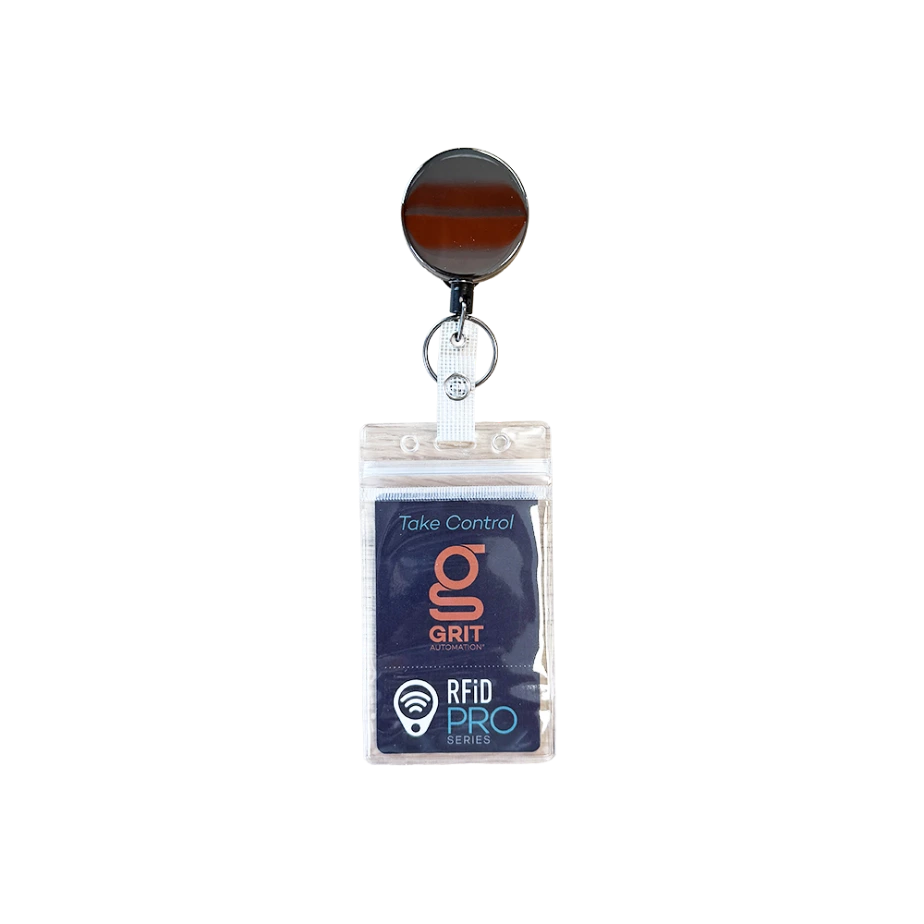
A way to identify a person or object using data transmitted through radio-frequency fields.NIST
A GRIT RFiD unit sends an identifier to the GRIT Hub, which finds the user or asset and applies the configured access, SignOn, or tracking action.
Cards, tags, and phonesExternal readers
What every RFiD option does
One job: connect a card, tag, or phone to the right person or asset.
Present a card, tag, or phone; GRIT reads its identifier; the GRIT Hub applies the configured action.
RFiD terms made simple
Know what the system needs to read.
Most RFiD decisions come down to the card technology, the identifier GRIT should read, and whether that identifier is protected.
A card identifier available without reading protected employee or student data. About 90% of cards present a stable UID; phones and some privacy-focused HID cards are common exceptions. Always verify with representative cards.
An employee, student, or card number stored inside protected card data. GRIT needs the correct card structure, encryption key, and read settings.
A secret value the reader needs to authenticate to protected card data. GRIT can use a supplied key but cannot recover a missing key.
A method that combines a master key with card-specific information to derive a different key for each card. One DESFire card can contain multiple applications or files with different keys and different diversification methods, including none.
Radio-frequency identification: radio communication used to identify a card, tag, phone, person, or object.
The radio band used by the card and reader. A shared frequency does not guarantee compatibility.
The low-frequency band used by HID Prox and other supported cards, tags, and stickers.
The high-frequency band used by MIFARE, MIFARE Classic, MIFARE DESFire, NFC, and some mobile wallet cards.
Ultra-high frequency, normally used for longer-distance reading; GRIT also offers short-range UHF readers.
The data format and security system inside the card. Frequency alone does not identify it.
A 13.56 MHz card technology with UID and protected sector/block data. Its legacy encryption can be broken.
A 13.56 MHz card technology that can contain multiple applications and files with separate keys and diversification methods.
A 125 kHz physical-access card technology available as a built-in GRIT reader option.
Physical access control system: the cards, readers, and access rules used for secured areas.
A reader interface that sends raw card bits for a GRIT Card Format to decode.
A USB reader that sends its result as if it were typed on a keyboard.
A USB smart-card reader interface used through PC/SC, the software path GRIT uses to communicate with a supported CCID reader. It is separate from keyboard-wedge input.
Bring Your Own Reader: the customer supplies a representative reader for a custom GRIT integration and enclosure.
Near-field communication: the 13.56 MHz technology used by supported mobile phones and mobile wallet cards.
A GRIT formatting rule that converts reader data into the user identifier GRIT should return.
Start here
Choose the least disruptive path.
Begin with the card the establishment wants to use, the identifier available in the user data, and whether the required keys are available.
Route
Use it when
What GRIT needs
Use the current card
GRIT can read a stable , or the establishment can provide the keys and diversification details for the .
The card UID or protected employee/student identifier used in the GRIT profile data.
Add a GRIT card or RFiD sticker
The current identification card has no usable RFiD, uses only a barcode or magnetic stripe, or another frequency is the cleaner option.
A GRIT card or sticker assigned to the user’s GRIT profile.
The customer prefers to use existing encrypted cards but cannot provide the required keys.
A representative external reader using , , or supported , plus the expected reader output format.
Supported technologies · Cards, tags, and phones
Match the reader to the credential.
Choose this family based on the already in use, the identifier GRIT needs, and whether protected data must be read.
01MIFARE and MIFARE ClassicTemporary GRIT cards and existing MIFARE systems.Frequency · 13.56 MHzReads · UID or protected block data
Compact spec
How it works.
GRIT can read the card UID or use supplied keys to read protected sector and block data.
Supported examples
MIFARE 1K temporary cards
MIFARE Classic cards
GRIT RFiD cards and stickers
Available configurations
2 pathsUID read
Frequency
13.56 MHz
Key
Not required
Protected MIFARE Classic read
Key
Key A or Key B
Location
Sector and block
02MIFARE DESFirePreferred encrypted card technology for new physical access control deployments.Frequency · 13.56 MHzReads · stable UID or protected file data
Compact spec
How it works.
With , GRIT can use an available stable public UID or authenticate to the selected application and file when the establishment provides the required and . Verify the UID with representative cards before choosing that path.
Supported examples
GRIT-managed encrypted DESFire cards
Allegion or Schlage DESFire access cards with supplied keys
Cards with multiple applications, files, keys, and diversification methods
Available configurations
2 pathsUID read
Key
Not required
Result
Verified stable public card UID
Protected file read
Requires
Application, file, key slot, key type, key, and diversification method
03NFC mobile phonesAdd a mobile wallet credential alongside a physical card.Platforms · Apple and AndroidOptions · encrypted or non-encrypted
Compact spec
How it works.
GRIT supports encrypted and non-encrypted mobile wallet cards on Apple and Android. GRIT-issued mobile cards work out of the box; supported third-party cards require separate Apple and Google configuration information and keys.
Supported examples
GRIT mobile wallet cards
supported non-GRIT Apple Wallet and Google Wallet cards
encrypted and non-encrypted NFC mobile cards
Available configurations
3 optionsGRIT mobile wallet
Setup
Works out of the box
Apple Wallet
Requires
Pass Type ID and Apple EC Private Key
Google Wallet
Requires
Collector ID, Key Version, and Google EC Private Key
The built-in option reads supported 125 kHz HID Prox cards without requiring an external reader.
Compatibility note
HID Prox is separate from other 125 kHz tag technologies
some HID cards may contain more than one credential technology
test representative production cards before rollout
Available configuration
1 optionGRIT HID Prox reader
Frequency
125 kHz
Best fit
Supported HID Prox card populations
05125 kHz cards, tags, and stickersA separate low-frequency reader option for supported 125 kHz media.Frequency · 125 kHzMedia · Cards, tags, and stickers
Compact spec
How it works.
The reader returns the identifier from a supported 125 kHz card, tag, or sticker.
Use it when
the existing card has no usable RFiD
a 125 kHz sticker is being added to an identification card
the selected media is not HID Prox
Available configuration
1 optionGRIT 125 kHz reader
Frequency
125 kHz
Media
Supported cards, tags, and stickers
06UHF tags and stickersLong-range or short-range UHF for tags and mixed card populations.Frequency · UHFRange · Long or short
Compact spec
How it works.
GRIT supports longer-distance reading and short-range UHF readers that make a UHF tag behave like a normal close-range credential.
Use it when
the application requires longer read distance
one sticker technology is needed across 13.56 MHz and 125 kHz populations
a short-range UHF reader should limit the presentation distance
Available configurations
2 optionsLong-range UHF
Best fit
Applications requiring longer read distance
Short-range UHF
Best fit
Close-range tag presentation across mixed card populations
Supported technologies · External readers
Keep the reader that already understands the card.
Choose an external reader when it should provide the identifier to GRIT or when the establishment prefers to keep using encrypted cards without supplying the keys.
01USB keyboard-wedge readerAccept an identifier as keyboard input.Connection · USBOutput · Text string
Compact spec
How it works.
A reader sends its result as keyboard input, and GRIT uses that string as the credential identifier.
Supported example
external USB RFiD readers operating as HID keyboard-wedge devices
Available configuration
1 optionUSB keyboard wedge
Output
Text string
Best fit
GRIT Track SignOn or GRIT Asset Tracker stations using a desktop reader
02CCID USB readerIntegrate a supported USB reader through CCID/PC/SC.Connection · USBInterface · CCID/PC/SC
Compact spec
How it works.
GRIT communicates with the reader through /PC/SC. It does not treat the reader as a keyboard wedge.
Supported example
HID OMNIKEY 5025 CL for 125 kHz HID Prox cards
Available configuration
1 exampleHID OMNIKEY 5025 CL
Connection
USB 2.0 Type-A; CCID/PC/SC
Card technology
HID Prox, 125 kHz
03Wiegand / BYORKeep using an existing PACS reader through a custom GRIT integration.Interface · Wiegand preferredCustomer provides · Representative reader
Compact spec
How it works.
The customer supplies a representative reader. GRIT creates the custom enclosure and uses a to decode the reader output.
Supported examples
existing HID readers
existing Schlage or Allegion readers
other PACS readers that provide Wiegand output
compatible readers for protected Seos or iCLASS identity data
If GRIT must read protected HID Seos or iCLASS identity data, use BYOR with a compatible reader.
Available configuration
1 custom pathBYOR — Bring Your Own Reader
Connection
Wiegand preferred
Customer provides
Representative reader and expected identifier format
Applies to
GRIT Track SignOn, GRIT Asset Tracker, and custom tool-access installations
User data
The import feed changes the RFiD setup.
These Data Import fields determine whether the credential is linked during import, read from protected card data, assigned at first use, or delivered as a mobile card.
Data available
GRIT field or setting
Result
Card UID or reader-provided identifier
Physical ID Number
Associates the card with the correct GRIT profile during import.
Protected employee or student identifier
External System Id
Lets GRIT use protected card data to find the imported profile when keys and diversification details are available.
No card UID in the feed
Prompt To Assign RFiD Tag
SignOn prompts the identified user to assign a card, tag, or sticker.
User email for mobile onboarding
Send Mobile Card Email
Emails a GRIT mobile wallet card when Mobile Wallet is enabled and the user has an email address.
Test representative production cards at every step. A printed card brand or frequency alone does not prove compatibility.
UID path
Read the public card identifier.
Present a representative card to the selected GRIT reader.
Confirm that it returns the same identifier on repeated reads.
Import the UID through Physical ID Number, or assign it during first-use SignOn.
Confirm that the card resolves to the correct profile.
Protected PACS data
Authenticate to the required application and file.
Use Probe Card to inspect a representative card.
Select the application and file containing the required identifier.
Enter the read-key slot, key type, encryption key, and diversification method.
Set the read length and Card Format.
Compare the decoded value with External System Id.
Customer inputs: application, file, read-key slot, key type, encryption key, offset, length, output format, and diversification method. Supported diversification selections include None, AN10922, SAM AV1, and SAM AV2. GRIT cannot recover missing keys.
MIFARE Classic
Use supplied Key A or Key B.
Select the sector and block, set the read length and Card Format, and test the decoded identifier. GRIT supports MIFARE Classic protected reads for existing systems, although its legacy encryption can be broken.
Wiegand and Card Formats
Turn raw card bits into the expected user string.
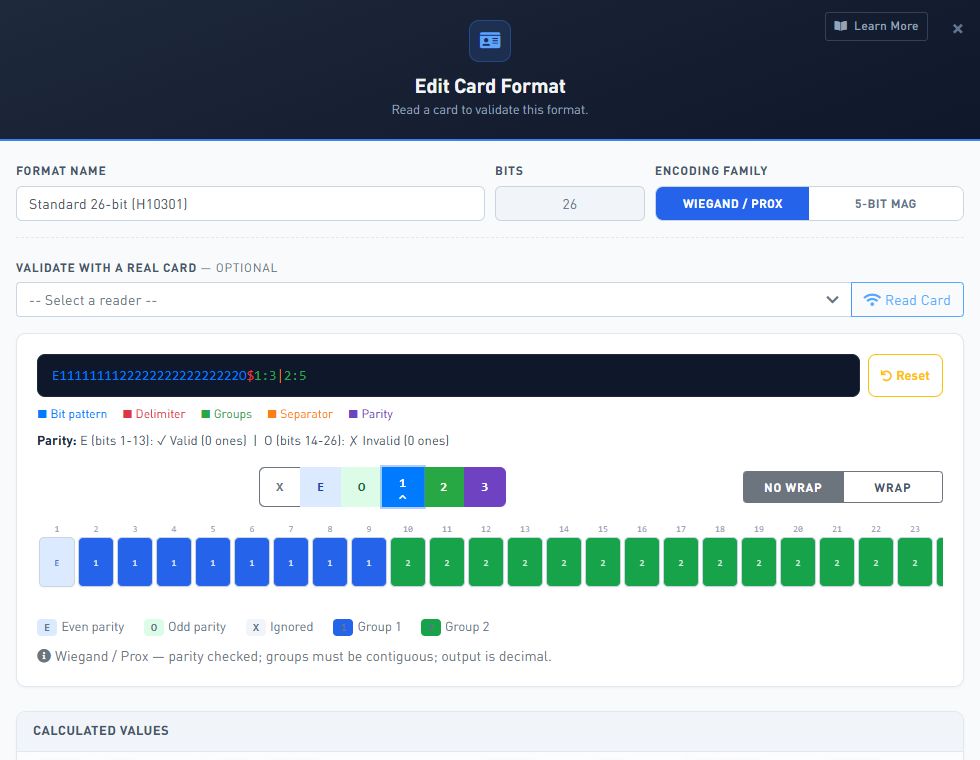
Capture the raw bitstream; identify facility-code and card-number groups; configure parity and zero-padding; then review the raw, decimal, hexadecimal, and formatted results. Save the Card Format, bind it to the Wiegand reader or supported DESFire file data, and test representative production cards. Changing the format later changes the identifier GRIT produces and can prevent existing card associations from resolving correctly.
USB keyboard wedge
Accept the reader output as keyboard input.
Connect the reader by USB.
Confirm that it sends the expected identifier as keyboard input.
Configure the applicable GRIT workflow to accept that input.
Test representative cards.
CCID reader
Use the separate CCID/PC/SC path.
Connect the supported CCID reader by USB.
Configure the CCID/PC/SC reader path.
Confirm that the reader returns the expected card identifier.
Test representative cards.
CCID is not a keyboard-wedge integration.
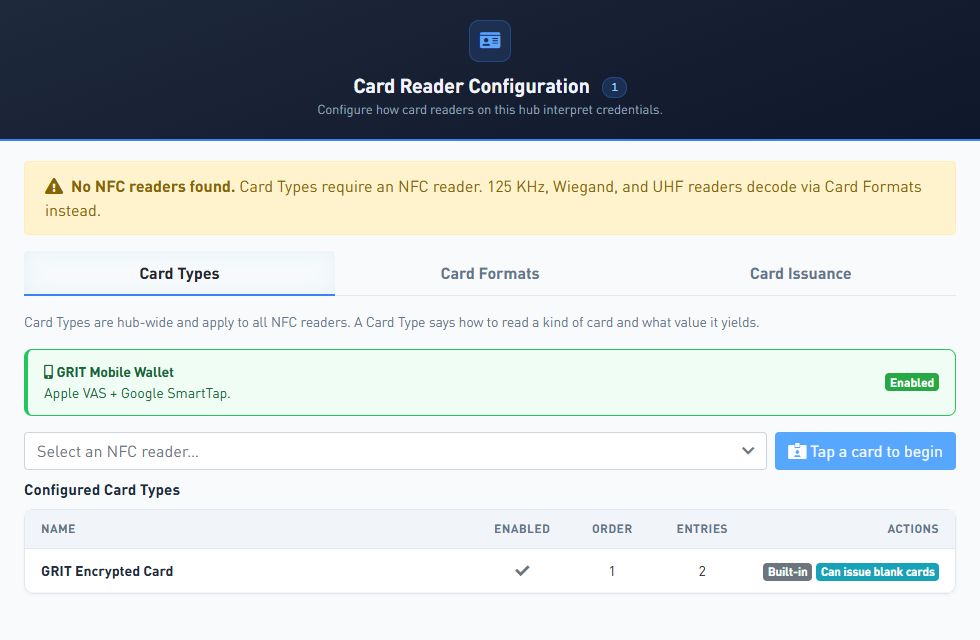
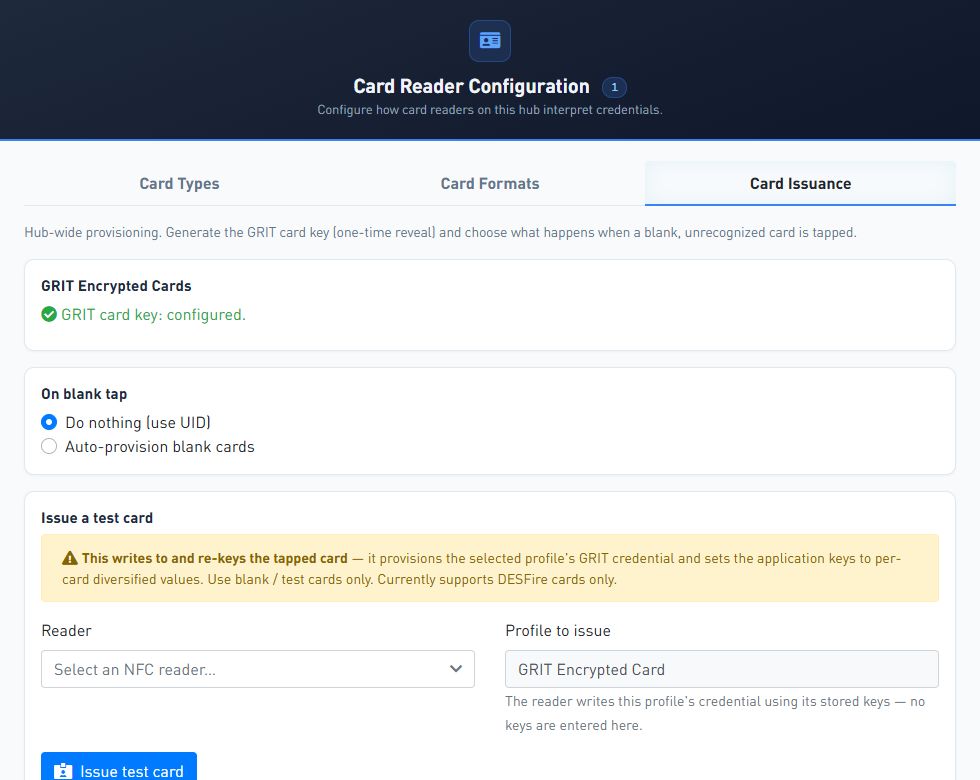
Card Reader Configuration keeps Card Types, Card Formats, and Card Issuance in one workflow.The Card Format editor maps Wiegand bits, parity, groups, padding, and the formatted identifier GRIT returns.Card Issuance uses the configured GRIT card key without displaying key values in the issuance workflow.
Card recommendations
Choose for the deployment you have.
Temporary GRIT cards
Typical GRIT temporary cards are MIFARE 1K cards. They are appropriate for temporary cards assigned by GRIT Track SignOn for use in the shop.
New encrypted door access
For new physical access control deployments, encrypted MIFARE DESFire cards are preferred. GRIT provides its built-in encryption scheme and keys for GRIT-managed cards.
Existing encrypted PACS cards
Use the card directly when GRIT has the required keys and diversification configuration. If the keys are unavailable, use a GRIT mobile wallet card, BYOR, or a GRIT card or sticker.
Existing MIFARE Classic cards
GRIT supports MIFARE Classic encryption for existing installations, even though the encryption can be broken. Do not choose it as the preferred technology for a new encrypted PACS deployment.
Mixed card populations
When an establishment uses both 13.56 MHz and 125 kHz cards, a common UHF sticker with a short-range UHF reader can avoid installing both reader types at every GRIT location.
Usage scenarios
See RFiD in real installations.
Reader technology changes by site. The physical installation still needs to fit the doorway, kiosk, or controlled area where people present their credential.
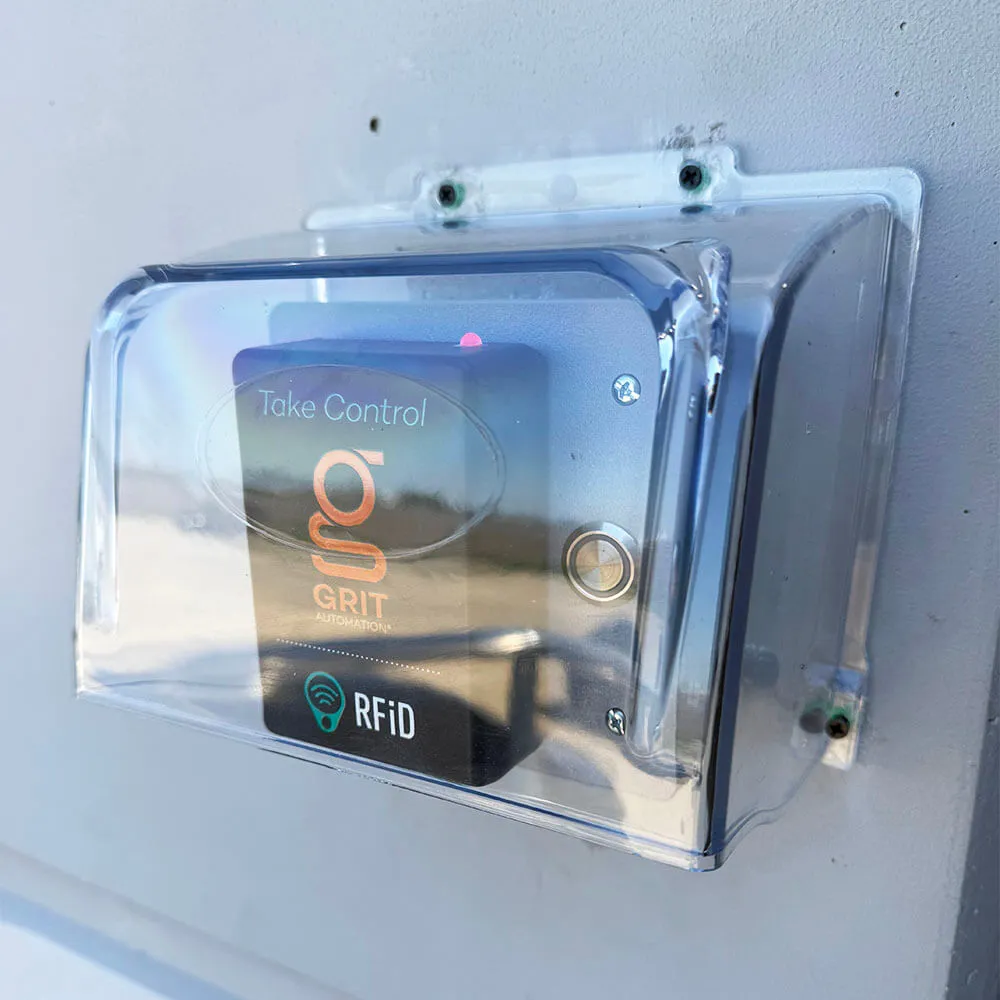
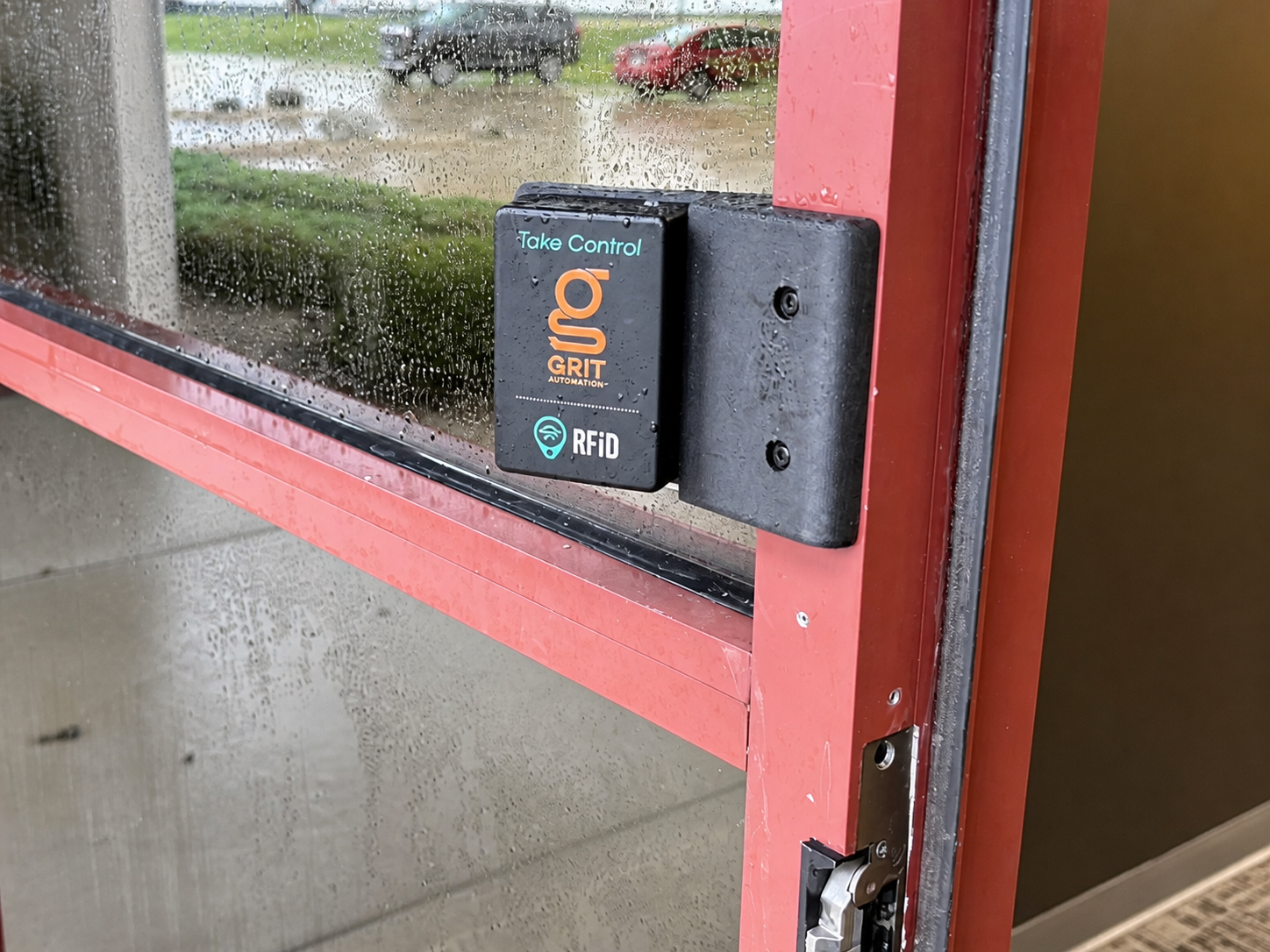
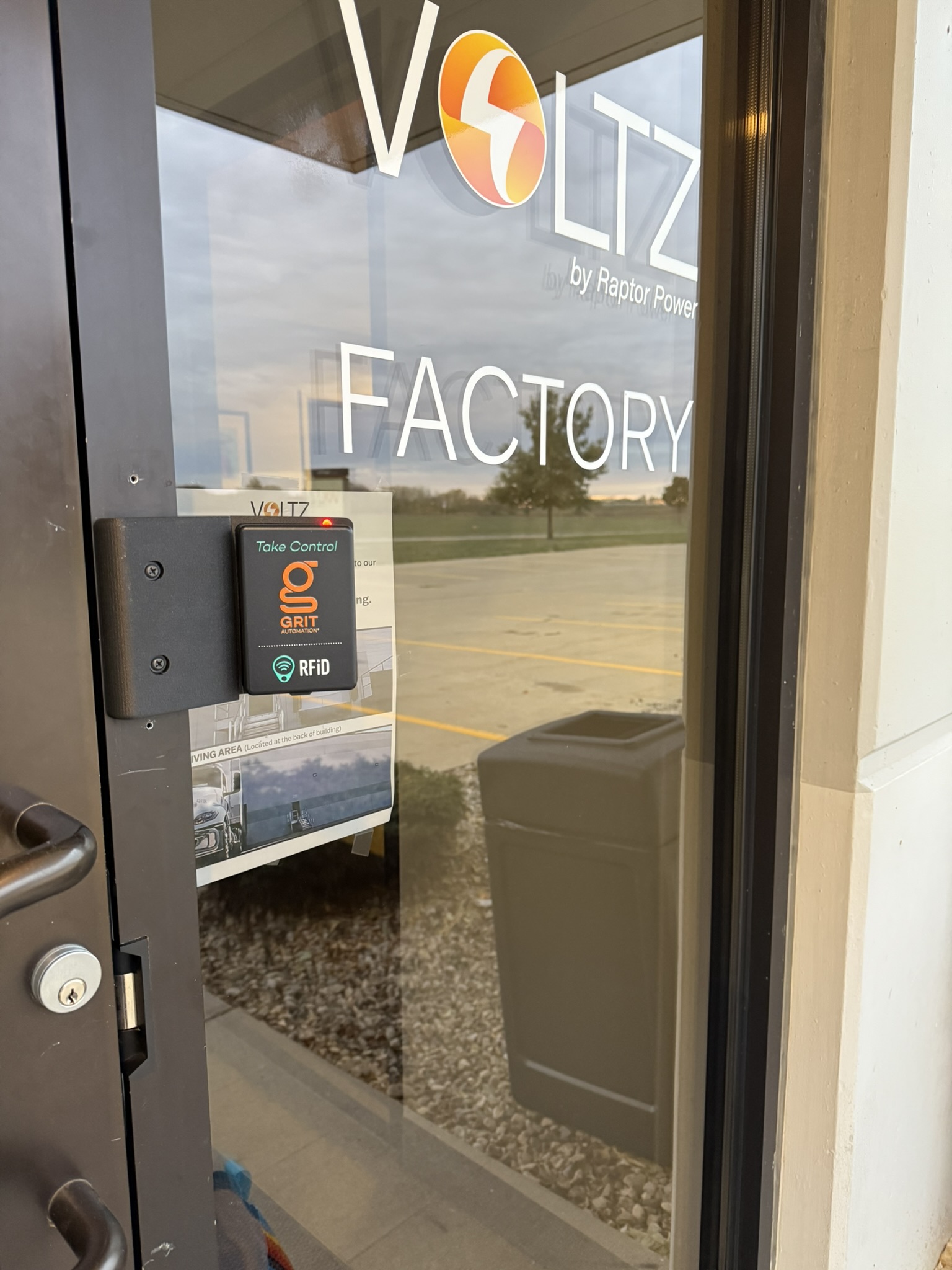
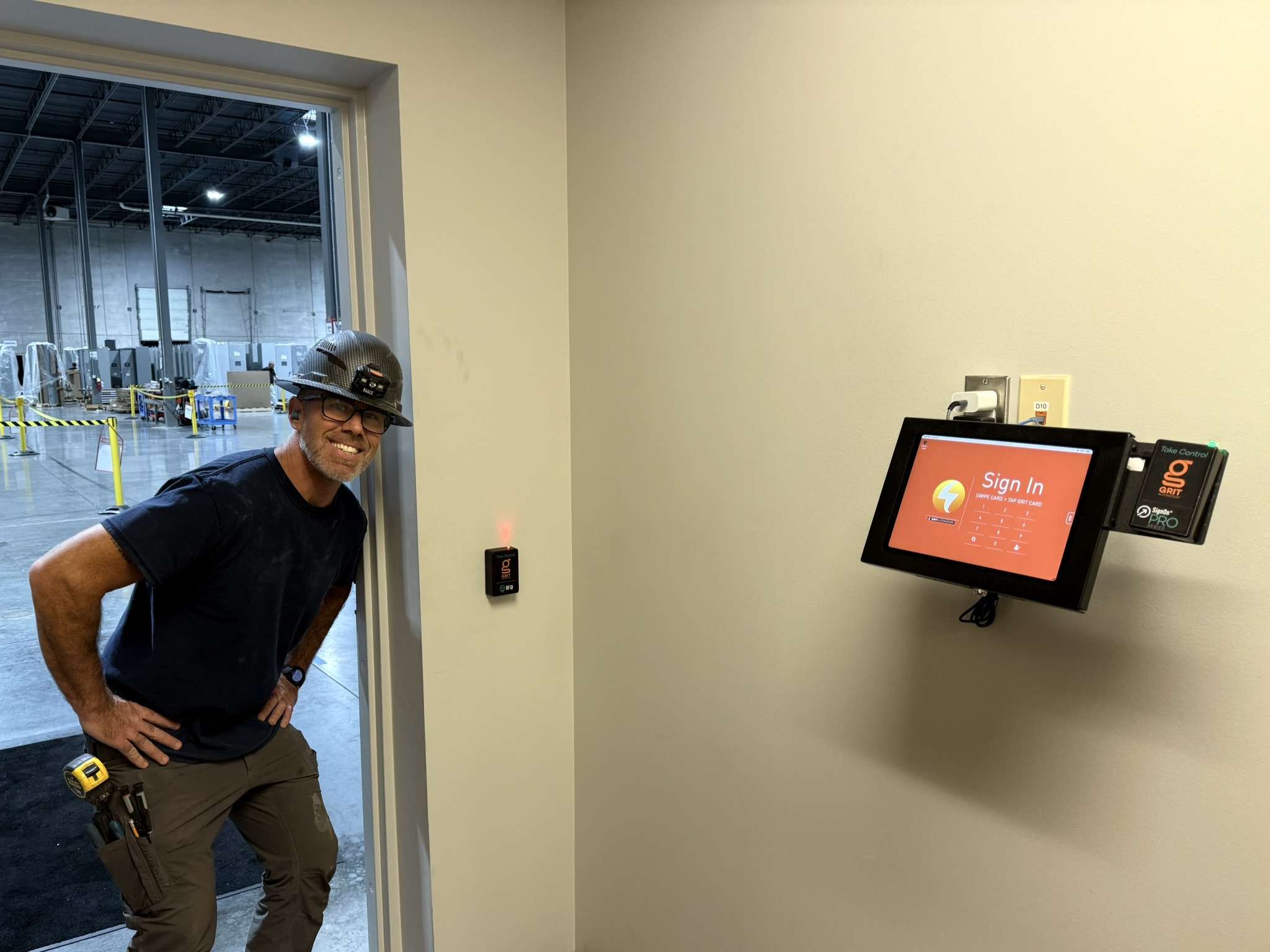
Exterior door access with a GRIT RFiD reader installed beside the opening.A GRIT RFiD reader at a factory entrance.GRIT Track SignOn and RFiD readers installed beside a manufacturing-floor entrance.
Overview
What is
RFiDR-F-I-Dnoun
A way to identify a person or object using data transmitted through radio-frequency fields.NIST
A GRIT RFiD unit sends an identifier to the GRIT Hub, which finds the user or asset and applies the configured access, SignOn, or tracking action.
Cards, tags, and phonesExternal readers
What every RFiD option does
One job: connect a card, tag, or phone to the right person or asset.
Present a card, tag, or phone; GRIT reads its identifier; the GRIT Hub applies the configured action.
RFiD terms made simple
Know what the system needs to read.
Most RFiD decisions come down to the card technology, the identifier GRIT should read, and whether that identifier is protected.
A card identifier available without reading protected employee or student data. About 90% of cards present a stable UID; phones and some privacy-focused HID cards are common exceptions. Always verify with representative cards.
An employee, student, or card number stored inside protected card data. GRIT needs the correct card structure, encryption key, and read settings.
A secret value the reader needs to authenticate to protected card data. GRIT can use a supplied key but cannot recover a missing key.
A method that combines a master key with card-specific information to derive a different key for each card. One DESFire card can contain multiple applications or files with different keys and different diversification methods, including none.
Radio-frequency identification: radio communication used to identify a card, tag, phone, person, or object.
The radio band used by the card and reader. A shared frequency does not guarantee compatibility.
The low-frequency band used by HID Prox and other supported cards, tags, and stickers.
The high-frequency band used by MIFARE, MIFARE Classic, MIFARE DESFire, NFC, and some mobile wallet cards.
Ultra-high frequency, normally used for longer-distance reading; GRIT also offers short-range UHF readers.
The data format and security system inside the card. Frequency alone does not identify it.
A 13.56 MHz card technology with UID and protected sector/block data. Its legacy encryption can be broken.
A 13.56 MHz card technology that can contain multiple applications and files with separate keys and diversification methods.
A 125 kHz physical-access card technology available as a built-in GRIT reader option.
Physical access control system: the cards, readers, and access rules used for secured areas.
A reader interface that sends raw card bits for a GRIT Card Format to decode.
A USB reader that sends its result as if it were typed on a keyboard.
A USB smart-card reader interface used through PC/SC, the software path GRIT uses to communicate with a supported CCID reader. It is separate from keyboard-wedge input.
Bring Your Own Reader: the customer supplies a representative reader for a custom GRIT integration and enclosure.
Near-field communication: the 13.56 MHz technology used by supported mobile phones and mobile wallet cards.
A GRIT formatting rule that converts reader data into the user identifier GRIT should return.
Start here
Choose the least disruptive path.
Begin with the card the establishment wants to use, the identifier available in the user data, and whether the required keys are available.
Route
Use it when
What GRIT needs
Use the current card
GRIT can read a stable , or the establishment can provide the keys and diversification details for the .
The card UID or protected employee/student identifier used in the GRIT profile data.
Add a GRIT card or RFiD sticker
The current identification card has no usable RFiD, uses only a barcode or magnetic stripe, or another frequency is the cleaner option.
A GRIT card or sticker assigned to the user’s GRIT profile.
The customer prefers to use existing encrypted cards but cannot provide the required keys.
A representative external reader using , , or supported , plus the expected reader output format.
Supported technologies · Cards, tags, and phones
Match the reader to the credential.
Choose this family based on the already in use, the identifier GRIT needs, and whether protected data must be read.
01MIFARE and MIFARE ClassicTemporary GRIT cards and existing MIFARE systems.Frequency · 13.56 MHzReads · UID or protected block data
Compact spec
How it works.
GRIT can read the card UID or use supplied keys to read protected sector and block data.
Supported examples
MIFARE 1K temporary cards
MIFARE Classic cards
GRIT RFiD cards and stickers
Available configurations
2 pathsUID read
Frequency
13.56 MHz
Key
Not required
Protected MIFARE Classic read
Key
Key A or Key B
Location
Sector and block
02MIFARE DESFirePreferred encrypted card technology for new physical access control deployments.Frequency · 13.56 MHzReads · stable UID or protected file data
Compact spec
How it works.
With , GRIT can use an available stable public UID or authenticate to the selected application and file when the establishment provides the required and . Verify the UID with representative cards before choosing that path.
Supported examples
GRIT-managed encrypted DESFire cards
Allegion or Schlage DESFire access cards with supplied keys
Cards with multiple applications, files, keys, and diversification methods
Available configurations
2 pathsUID read
Key
Not required
Result
Verified stable public card UID
Protected file read
Requires
Application, file, key slot, key type, key, and diversification method
03NFC mobile phonesAdd a mobile wallet credential alongside a physical card.Platforms · Apple and AndroidOptions · encrypted or non-encrypted
Compact spec
How it works.
GRIT supports encrypted and non-encrypted mobile wallet cards on Apple and Android. GRIT-issued mobile cards work out of the box; supported third-party cards require separate Apple and Google configuration information and keys.
Supported examples
GRIT mobile wallet cards
supported non-GRIT Apple Wallet and Google Wallet cards
encrypted and non-encrypted NFC mobile cards
Available configurations
3 optionsGRIT mobile wallet
Setup
Works out of the box
Apple Wallet
Requires
Pass Type ID and Apple EC Private Key
Google Wallet
Requires
Collector ID, Key Version, and Google EC Private Key
The built-in option reads supported 125 kHz HID Prox cards without requiring an external reader.
Compatibility note
HID Prox is separate from other 125 kHz tag technologies
some HID cards may contain more than one credential technology
test representative production cards before rollout
Available configuration
1 optionGRIT HID Prox reader
Frequency
125 kHz
Best fit
Supported HID Prox card populations
05125 kHz cards, tags, and stickersA separate low-frequency reader option for supported 125 kHz media.Frequency · 125 kHzMedia · Cards, tags, and stickers
Compact spec
How it works.
The reader returns the identifier from a supported 125 kHz card, tag, or sticker.
Use it when
the existing card has no usable RFiD
a 125 kHz sticker is being added to an identification card
the selected media is not HID Prox
Available configuration
1 optionGRIT 125 kHz reader
Frequency
125 kHz
Media
Supported cards, tags, and stickers
06UHF tags and stickersLong-range or short-range UHF for tags and mixed card populations.Frequency · UHFRange · Long or short
Compact spec
How it works.
GRIT supports longer-distance reading and short-range UHF readers that make a UHF tag behave like a normal close-range credential.
Use it when
the application requires longer read distance
one sticker technology is needed across 13.56 MHz and 125 kHz populations
a short-range UHF reader should limit the presentation distance
Available configurations
2 optionsLong-range UHF
Best fit
Applications requiring longer read distance
Short-range UHF
Best fit
Close-range tag presentation across mixed card populations
Supported technologies · External readers
Keep the reader that already understands the card.
Choose an external reader when it should provide the identifier to GRIT or when the establishment prefers to keep using encrypted cards without supplying the keys.
01USB keyboard-wedge readerAccept an identifier as keyboard input.Connection · USBOutput · Text string
Compact spec
How it works.
A reader sends its result as keyboard input, and GRIT uses that string as the credential identifier.
Supported example
external USB RFiD readers operating as HID keyboard-wedge devices
Available configuration
1 optionUSB keyboard wedge
Output
Text string
Best fit
GRIT Track SignOn or GRIT Asset Tracker stations using a desktop reader
02CCID USB readerIntegrate a supported USB reader through CCID/PC/SC.Connection · USBInterface · CCID/PC/SC
Compact spec
How it works.
GRIT communicates with the reader through /PC/SC. It does not treat the reader as a keyboard wedge.
Supported example
HID OMNIKEY 5025 CL for 125 kHz HID Prox cards
Available configuration
1 exampleHID OMNIKEY 5025 CL
Connection
USB 2.0 Type-A; CCID/PC/SC
Card technology
HID Prox, 125 kHz
03Wiegand / BYORKeep using an existing PACS reader through a custom GRIT integration.Interface · Wiegand preferredCustomer provides · Representative reader
Compact spec
How it works.
The customer supplies a representative reader. GRIT creates the custom enclosure and uses a to decode the reader output.
Supported examples
existing HID readers
existing Schlage or Allegion readers
other PACS readers that provide Wiegand output
compatible readers for protected Seos or iCLASS identity data
If GRIT must read protected HID Seos or iCLASS identity data, use BYOR with a compatible reader.
Available configuration
1 custom pathBYOR — Bring Your Own Reader
Connection
Wiegand preferred
Customer provides
Representative reader and expected identifier format
Applies to
GRIT Track SignOn, GRIT Asset Tracker, and custom tool-access installations
User data
The import feed changes the RFiD setup.
These Data Import fields determine whether the credential is linked during import, read from protected card data, assigned at first use, or delivered as a mobile card.
Data available
GRIT field or setting
Result
Card UID or reader-provided identifier
Physical ID Number
Associates the card with the correct GRIT profile during import.
Protected employee or student identifier
External System Id
Lets GRIT use protected card data to find the imported profile when keys and diversification details are available.
No card UID in the feed
Prompt To Assign RFiD Tag
SignOn prompts the identified user to assign a card, tag, or sticker.
User email for mobile onboarding
Send Mobile Card Email
Emails a GRIT mobile wallet card when Mobile Wallet is enabled and the user has an email address.
Test representative production cards at every step. A printed card brand or frequency alone does not prove compatibility.
UID path
Read the public card identifier.
Present a representative card to the selected GRIT reader.
Confirm that it returns the same identifier on repeated reads.
Import the UID through Physical ID Number, or assign it during first-use SignOn.
Confirm that the card resolves to the correct profile.
Protected PACS data
Authenticate to the required application and file.
Use Probe Card to inspect a representative card.
Select the application and file containing the required identifier.
Enter the read-key slot, key type, encryption key, and diversification method.
Set the read length and Card Format.
Compare the decoded value with External System Id.
Customer inputs: application, file, read-key slot, key type, encryption key, offset, length, output format, and diversification method. Supported diversification selections include None, AN10922, SAM AV1, and SAM AV2. GRIT cannot recover missing keys.
MIFARE Classic
Use supplied Key A or Key B.
Select the sector and block, set the read length and Card Format, and test the decoded identifier. GRIT supports MIFARE Classic protected reads for existing systems, although its legacy encryption can be broken.
Wiegand and Card Formats
Turn raw card bits into the expected user string.
Capture the raw bitstream; identify facility-code and card-number groups; configure parity and zero-padding; then review the raw, decimal, hexadecimal, and formatted results. Save the Card Format, bind it to the Wiegand reader or supported DESFire file data, and test representative production cards. Changing the format later changes the identifier GRIT produces and can prevent existing card associations from resolving correctly.
USB keyboard wedge
Accept the reader output as keyboard input.
Connect the reader by USB.
Confirm that it sends the expected identifier as keyboard input.
Configure the applicable GRIT workflow to accept that input.
Test representative cards.
CCID reader
Use the separate CCID/PC/SC path.
Connect the supported CCID reader by USB.
Configure the CCID/PC/SC reader path.
Confirm that the reader returns the expected card identifier.
Test representative cards.
CCID is not a keyboard-wedge integration.
Card Reader Configuration keeps Card Types, Card Formats, and Card Issuance in one workflow.The Card Format editor maps Wiegand bits, parity, groups, padding, and the formatted identifier GRIT returns.Card Issuance uses the configured GRIT card key without displaying key values in the issuance workflow.
Card recommendations
Choose for the deployment you have.
Temporary GRIT cards
Typical GRIT temporary cards are MIFARE 1K cards. They are appropriate for temporary cards assigned by GRIT Track SignOn for use in the shop.
New encrypted door access
For new physical access control deployments, encrypted MIFARE DESFire cards are preferred. GRIT provides its built-in encryption scheme and keys for GRIT-managed cards.
Existing encrypted PACS cards
Use the card directly when GRIT has the required keys and diversification configuration. If the keys are unavailable, use a GRIT mobile wallet card, BYOR, or a GRIT card or sticker.
Existing MIFARE Classic cards
GRIT supports MIFARE Classic encryption for existing installations, even though the encryption can be broken. Do not choose it as the preferred technology for a new encrypted PACS deployment.
Mixed card populations
When an establishment uses both 13.56 MHz and 125 kHz cards, a common UHF sticker with a short-range UHF reader can avoid installing both reader types at every GRIT location.
Usage scenarios
See RFiD in real installations.
Reader technology changes by site. The physical installation still needs to fit the doorway, kiosk, or controlled area where people present their credential.
Exterior door access with a GRIT RFiD reader installed beside the opening.A GRIT RFiD reader at a factory entrance.GRIT Track SignOn and RFiD readers installed beside a manufacturing-floor entrance.

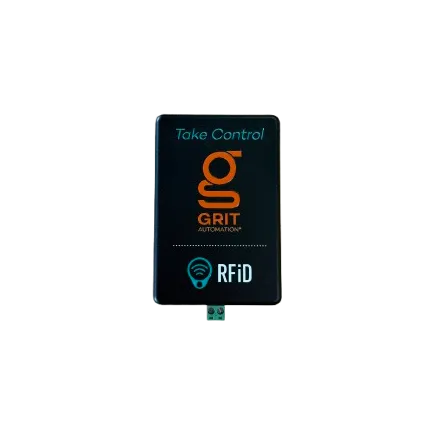 MIFARE and MIFARE Classic
Temporary GRIT cards and existing MIFARE systems.
Frequency · 13.56 MHz
Reads · UID or protected block data
MIFARE and MIFARE Classic
Temporary GRIT cards and existing MIFARE systems.
Frequency · 13.56 MHz
Reads · UID or protected block data